My website said eight jobs ran without a person. Two still did.
I rebuilt instig8.ai in 63 minutes on 2 October 2026, starting from questions, not a design. An hour later I checked it against my own business. Here is the build, the check, what it turned into, the real prompts, and templates you can copy.
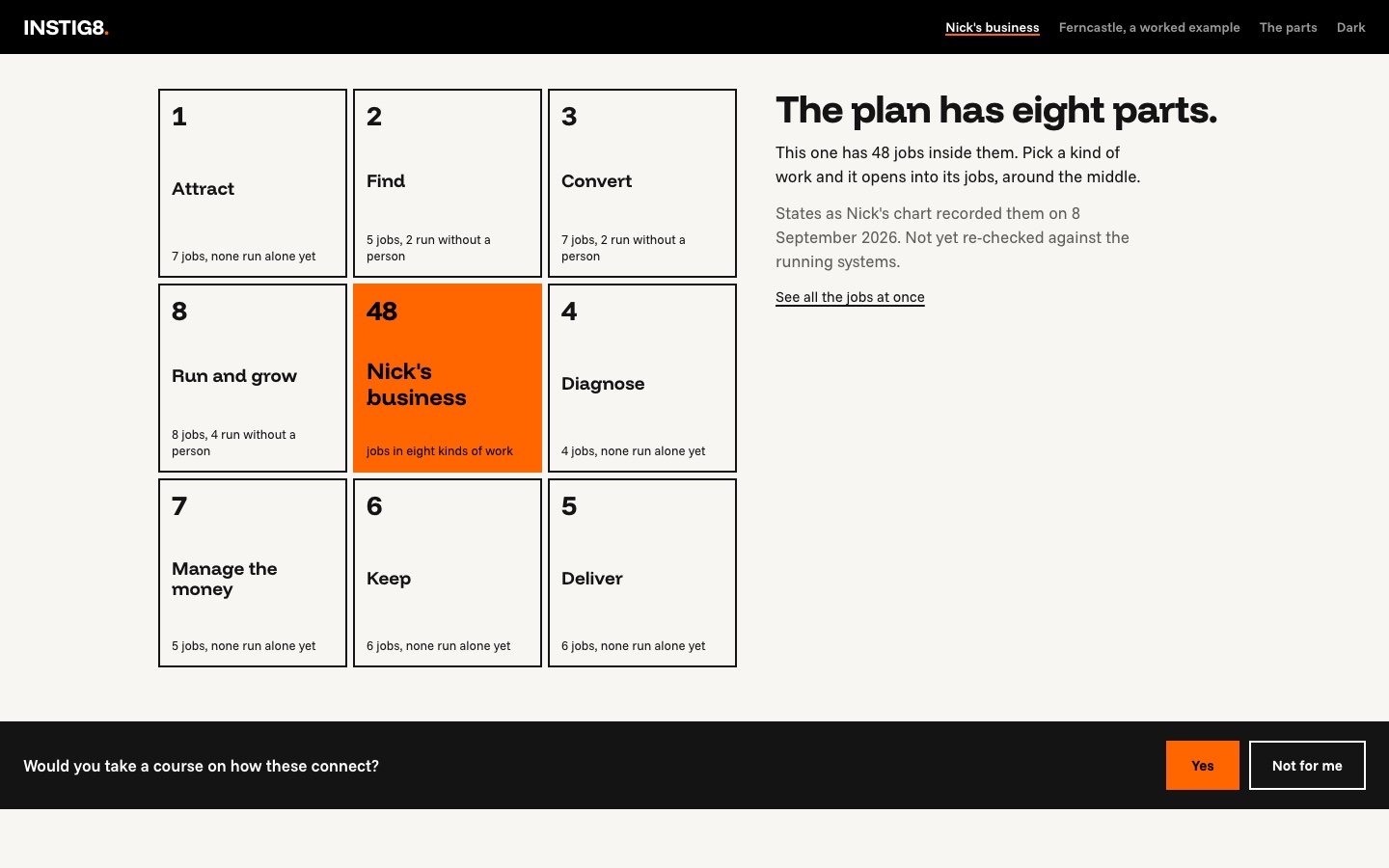
On the afternoon of 2 October my studio's website, instig8.ai, still described INSTIG8 as a venture studio (a company that starts companies) recruiting experts. INSTIG8 is my studio: the place where I build the systems my own business runs on. At 4:06 p.m. I started a session (one conversation with my AI assistant) to rethink the site. At 5:10 p.m. the new one was live. It shows my business as eight kinds of work and the recurring jobs inside each. Every job carries a label saying how it runs today, such as "runs without a person" or "done by hand".
At 5:51 I asked the same session to check those labels against what was actually running. The site said eight jobs ran without a person. Two of them still did. The job on the site's first screen had been switched off since 27 September.
This post covers both halves. First, how to build a page from questions instead of a design. Then, what to do when the page turns out to be wrong. If you build, you'll find the prompts (the instructions I typed to the AI) and templates to copy. If you run a business, skip to "What this means if you run a business" near the end.
The short version
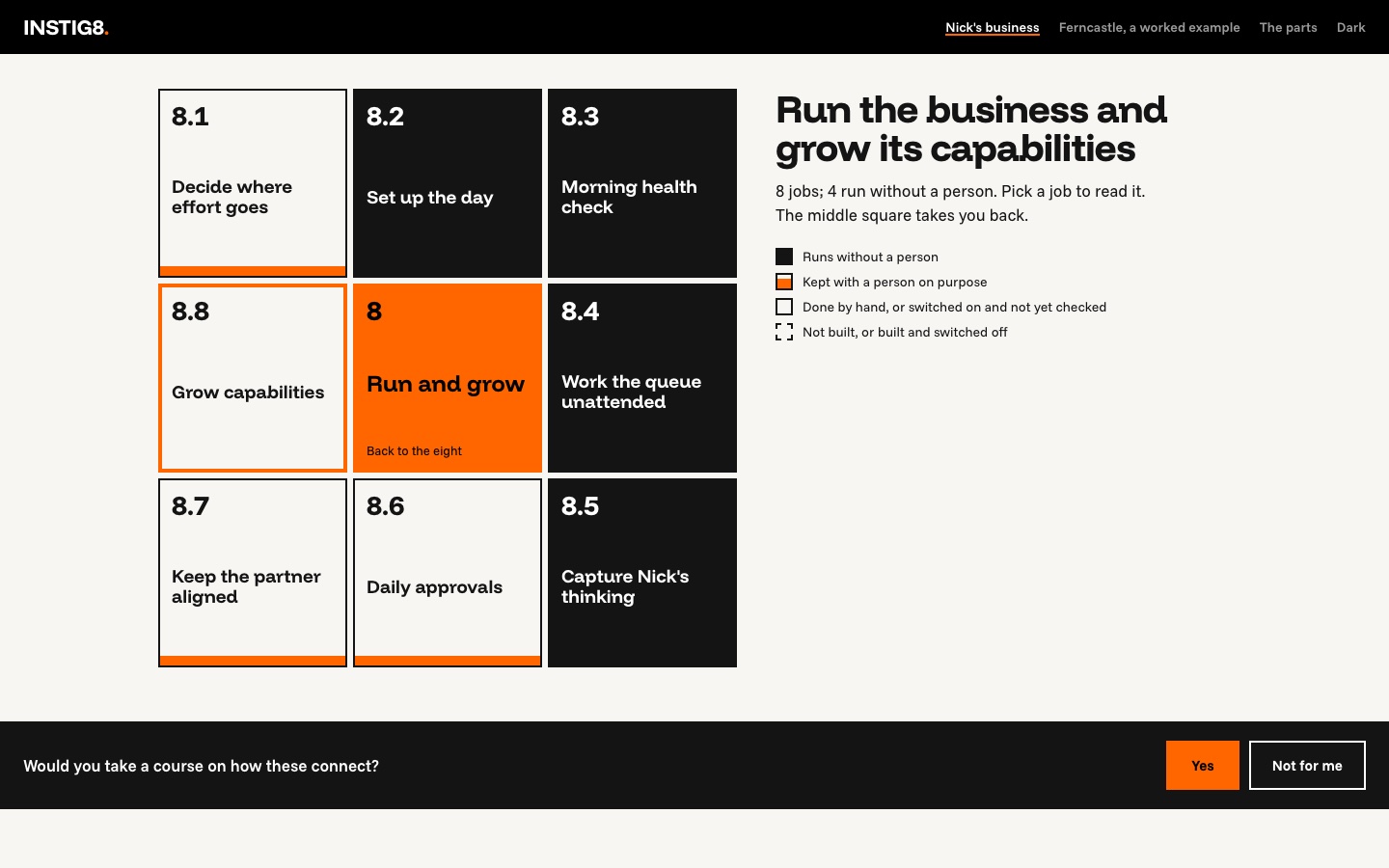
- What shipped: a rebuilt instig8.ai. The first screen shows one job from my business. Behind it, my business sits in the middle of a three-by-three grid with the eight kinds of work around it; each opens into its jobs. A made-up company, Ferncastle, is a second example, labelled as one everywhere. A pricing page has three tiers and no prices yet.
- When: first prompt 4:06 p.m., live 5:10 p.m. My own headline went live at 5:47. I worked in Claude Code, an AI assistant that reads and changes files on my Mac. A session is one conversation with it, and it starts with no memory of the last one.
- The check: at 5:52 a read-only check compared the site's 48 job labels with my automations (software set up to do a task by itself). Three of the 48 jobs had a verified run in the last seven days. Four jobs no longer existed. Ten labels, set on 8 September, no longer matched what was running.
- What it turned into: a rule for every work folder on my Mac, instead of a fix to the website. The site may only say what the business can prove.
- What to steal: the templates are at the end.
Before and after
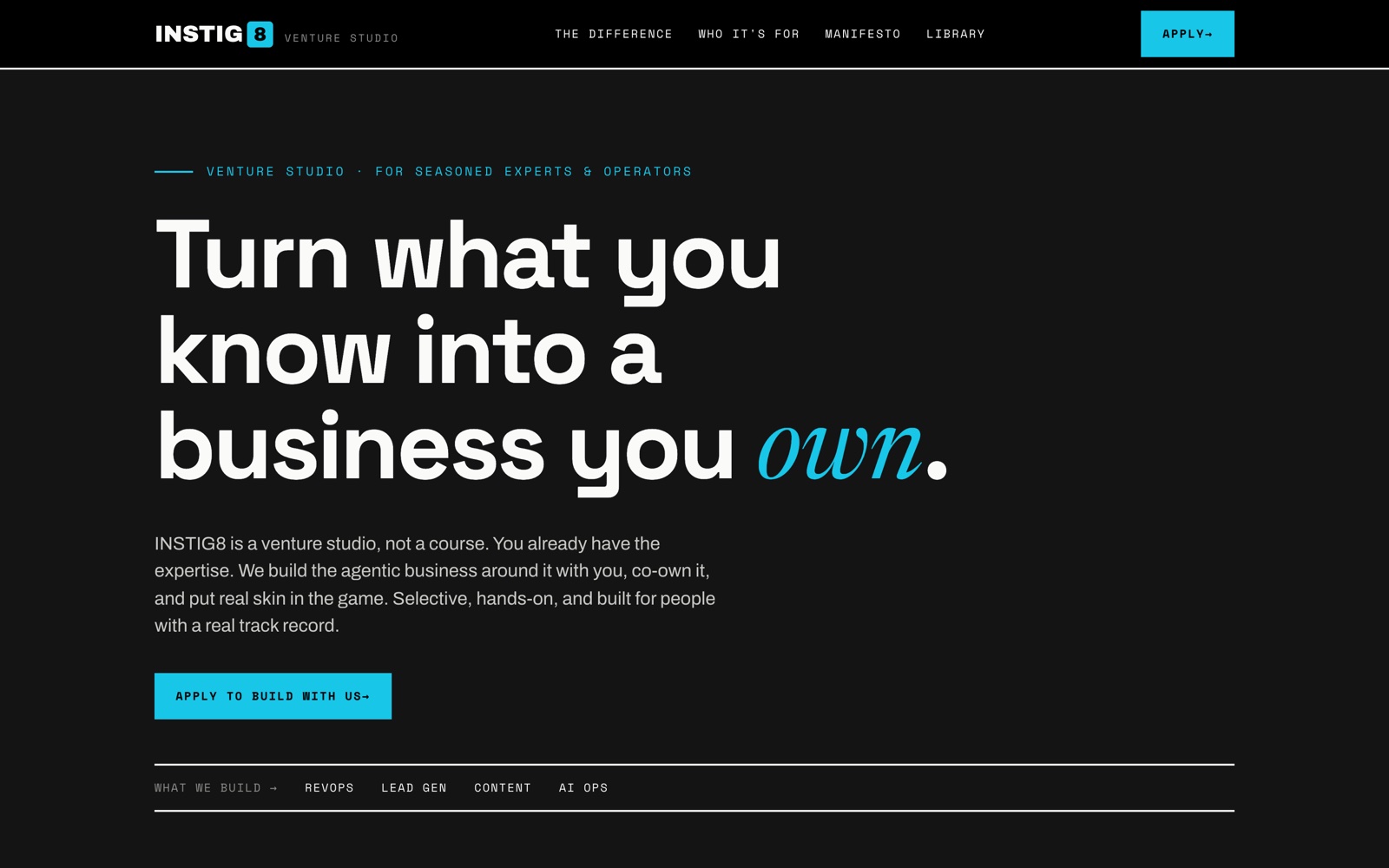
That morning the site recruited experts for a venture studio, with an application form and a wall of ten company logos.
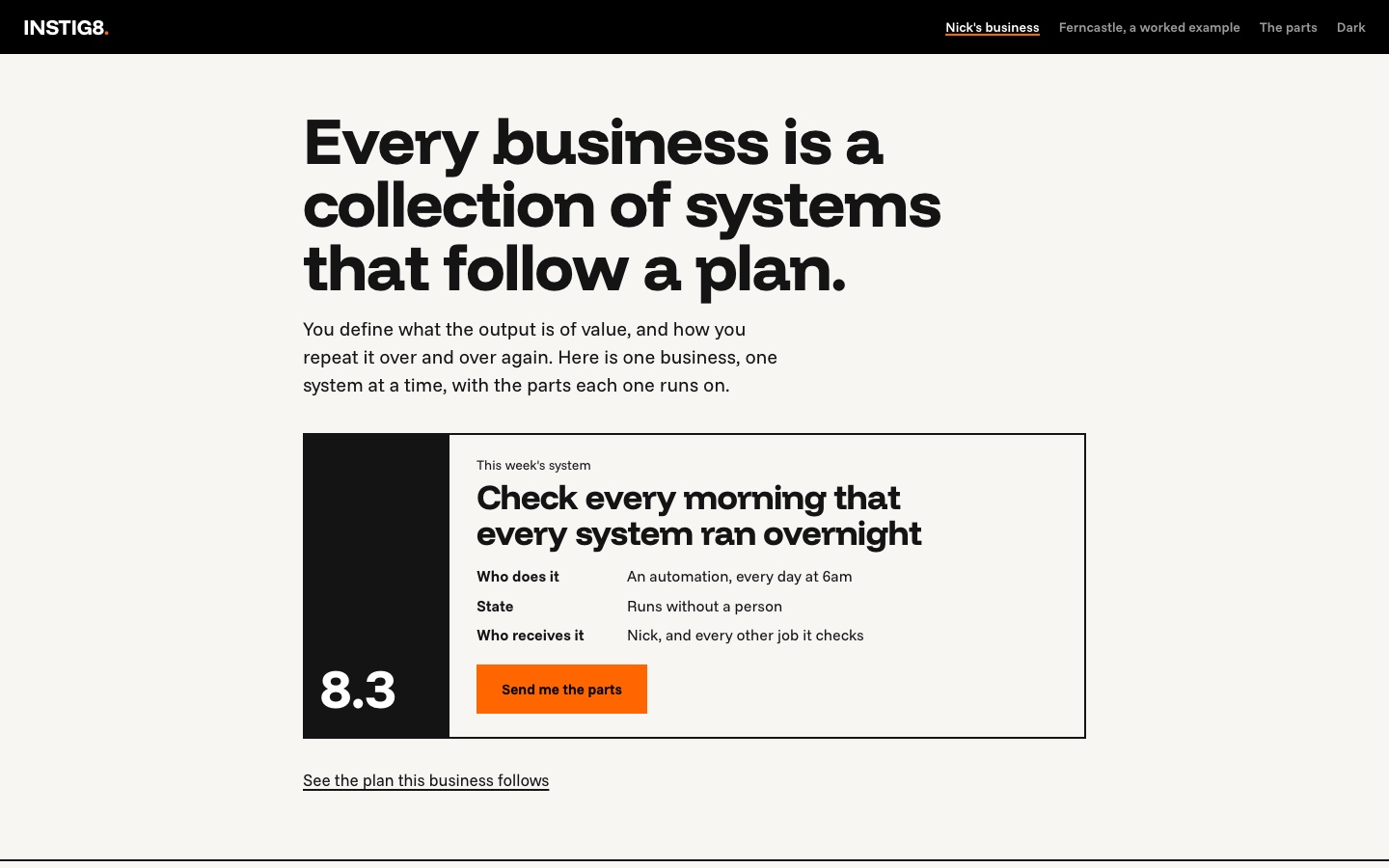
After: one sentence, then one job. Everything else is one click deeper.
The setup in one picture
Everything I do for the business lives in one folder on my Mac called work (~/work). Inside it is one folder per area of work: the websites, my practice, the content, and so on. I also call these folders workspaces. Each folder is its own git repository. Git keeps a history of every change; each saved change, called a commit, gets a time. Each folder also has a plain text file, CLAUDE.md, that tells any session what the folder is for.
The method is Interpretable Context Methodology (ICM), published by Jake Van Clief and David McDermott. Plain instructions are written into each folder, so any session that opens it knows what it's looking at. I adapted it to run a business.
Three folders did the work in this story. web-portfolio holds the site code. practice holds my written method, which I call the line: where the customer stops, where the machine starts, and what the person is for. The third is an archive of my old operating folder, the one my business ran from until I archived it on 28 September. I only read it.
How one folder works
The site's folder holds one file that says what the site is, before any design. A session wrote it with me in the first 25 minutes, and every later session reads it first. Its opening, as it stands:
# instig8.ai: what the site is

Written 2026-10-02, before any design, and kept as the site's direction:
read this first before changing instig8.ai.

## In one paragraph

instig8.ai shows a business run with AI, one piece of work at a time, and
hands over the parts that piece of work runs on. Every business does the
same eight kinds of work. Inside each kind are the recurring jobs that keep
it going. For each job the site shows how it actually runs today (by a
person, by an AI agent, or by an automation, and whether it is working) and
offers its parts to download [...]
The parts are the templates and files a job runs on. An automation follows fixed steps; an AI agent is an AI program that decides its own next step.
The folder's routing file (CONTEXT.md, which says which file handles which request) now says, in one row: to change instig8.ai, read that file first. The direction lives in a file, where the next session finds it. My head forgets, and a chat scrolls away.
How folders hand work to each other
One session never does everything. When work belongs to another folder, the session writes a prompt for it into a file. This one, at the end of the design record in my practice folder, starts the session that will build the next folder:
Build a new workspace for my business chart and the shared incident record.
Read ~/work/practice/docs/shared-incident-record-2026-10-03.md first, all of
it: it holds my three rulings [...] The chart it starts from is
[...] (read only; copy, never move) and the evidence of what
runs today is [...]. Run the placement decision first and record
it. I named it on 2026-10-03: ~/work/the-chart. Put the decisions in the
"Still open" list to me one at a time, with your recommendation. Do not edit
other workspaces' AUTOMATION.md files or skills in this build; list those
changes as the rollout for me to approve.
In that prompt, the business chart is my map of the eight kinds of work and their jobs. The shared incident record is one log of real events, explained below. The three rulings are three decisions I made. The placement decision is the first step of my routine for building a folder: deciding where it belongs. AUTOMATION.md is each folder's list of what runs on its own, and skills are saved instructions a session can load by name.
The session that opened this story started the same way: I pasted a prompt another session had written for it that morning.
The day, as it happened
4:06 p.m. Questions before design
The prompt I pasted asked for a thinking session before any build:
This is a thinking session before it is a build: work through with me what
the instig8.ai experience is [...] Start by putting to me, one at a time with
your recommendation drawn from my own files, what the eight functions are;
then what an activity and its template are; then which businesses are on view
and how a demo is labelled; then what a reader can do on the page; then what
is explicitly not on it. Write the result as one plain page [...] and cold-read
it before any design.
In my words, functions are the eight kinds of work and an activity is a job. Its template is the version of that job a reader can download. A cold read is a test: a fresh AI reader gets only the page and marks every phrase it can't follow.
The session's first answer was wrong. It found no file naming eight functions, so it grouped my folders into eight of its own. I pointed it at my archived chart from September. It withdrew its list within a minute: "the eight already exist, you ratified them on 2026-09-02." Ratified means I had formally approved them. They are Attract, Find, Convert, Diagnose, Deliver, Keep, Manage the money, and Run and grow. Each holds up to eight jobs: 64 squares, 48 of them filled.
What it taught: an AI that can't find your answer will make one up that sounds reasonable. Point it at your own files.
4:20 p.m. What is the site for?
Two questions in, I stopped it:
Let's take a step back. What is the goal of the INSTIG8website? What are we
trying to do with this? What's the story? What's the utility? Answer that
first.
My answer to its follow-up set the direction for everything after:
This is where people will go to get all of the tools, all of the repos, the
GitHub URLs for the downloads, and the AirTable and n8n templates. Everything
I build, I'll templateize and add to this website. [...] people will grab
pieces of what they want, but it will only truly work when it all works
together.
A repo is a code folder, and GitHub is where repos are shared. Airtable is a spreadsheet-style database. n8n is a tool that runs automations.
Then, at 4:29: "right now I just need you to build the site." The session decided the remaining questions itself and wrote the one-page description. Then it gave a fresh AI reader only that page and had it mark every phrase it couldn't follow. The first reader found 25. After a rewrite, a second found 6.
4:37 p.m. "Seasick and dizzy"
An earlier version of these pages, from September, had shown all 64 squares at once. So I said:
It was far too complex and overwhelming. People would look at it, and they
wouldn't know what to do. They got seasick and dizzy because it was so much
information. We have to figure that process out: how to slow down the flow of
information or make it less dense. Research online to get some help.
It came back with four levels, and the whole grid never comes first. Level one is one job. Level two is the eight kinds of work. Level three is one kind opened into its jobs, and level four is one job opened into its card, a panel with that job's details. Then I added my own idea:
the original 64 chart [...] could be a view that is just the eight functions
surrounding the center. If you click it, it opens it up or drills down into
the next layer. [...] I want you to still mock up your four levels because I
want to see that.
The center is the middle square, where my business sits. It mocked up both in Claude Design, Anthropic's design tool. I looked at both and answered: "combine them, one job first then eight around the center". A third mockup combined them.
5:00 p.m. Build, and three tries to ship
"yes, the design is right, start the build" at 5:00. The session deleted the old site (24 files, ten of them company logos). It wrote the new one with 54 automated checks where there had been none. They are tests that run before each release. They fail if, say, a font that reads as AI-made or a word from the old site slips back in. Then it clicked through every level on desktop and phone, light and dark. Then it stopped and asked before going live.
Shipping took three tries. Deploying means publishing the new version to the live site. The usual deploy command failed because a folder path came out doubled. The second try died halfway through an upload. The third, sent as one compressed file, worked. The site answered at 5:10, 63 minutes after the first prompt. The command that works is now written in the folder's automation file, so the next session won't rediscover it. That file, AUTOMATION.md, is the folder's list of what runs on its own.
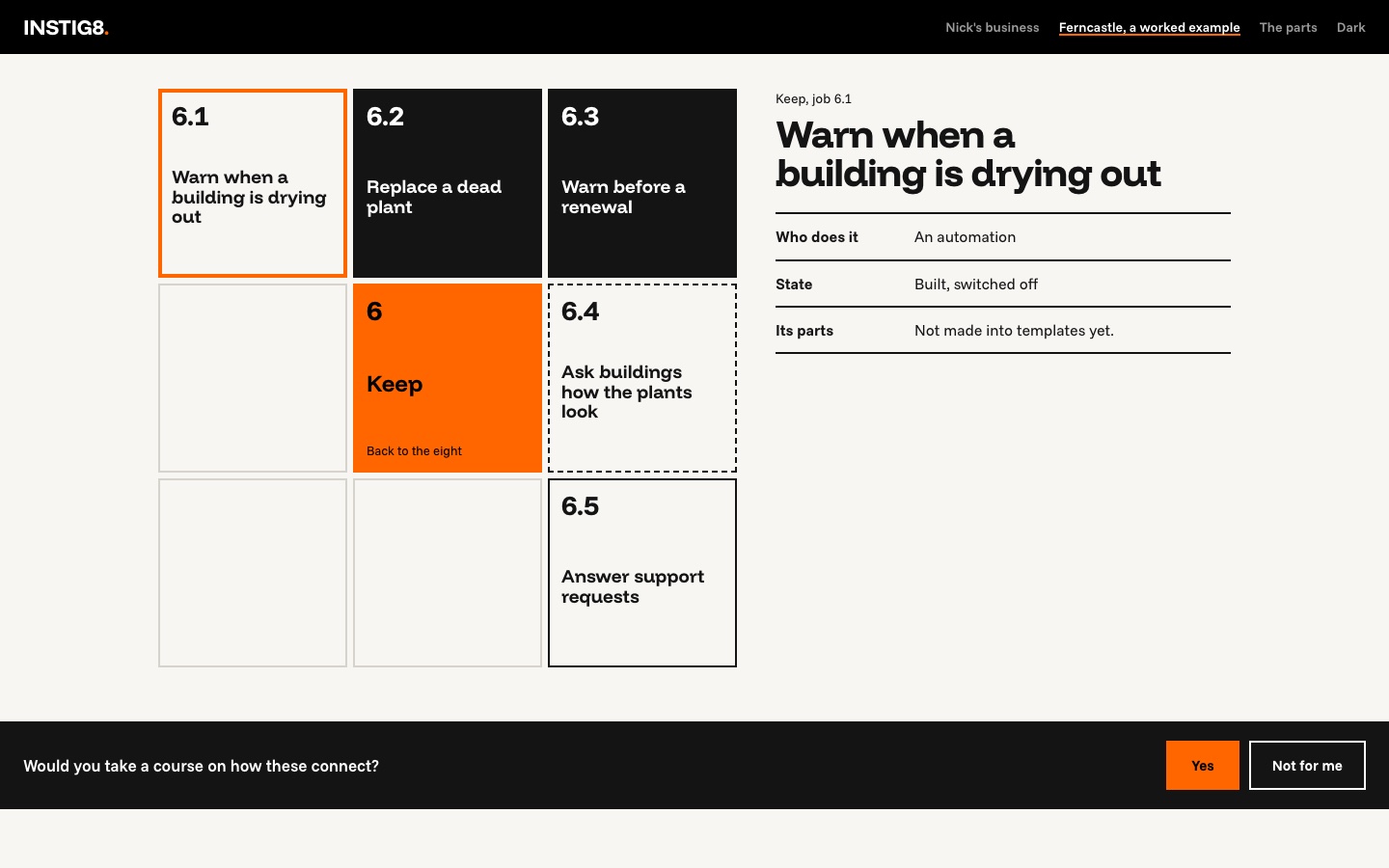
Ferncastle went live at 5:27. It's a made-up company of 180 people that keeps office plants alive, drawn on the same eight with 34 jobs. It says "worked example" everywhere it appears.
5:39 p.m. My words, not the AI's
The headline was the AI's draft until I asked for one of my own lines:
help me rewrite the headline and short lines. One of the headlines I like is
the one where we talk about how every business is a collection of systems
that follow a plan. There's more to it, but I like that.
It found the sentence in my past sessions, where it was recorded as approved by me on 16 September, and proposed it word for word. It also marked which other lines were mine and which were its drafts. "Every business is a collection of systems that follow a plan." went live at 5:47.
5:51 p.m. The check
yes, check the 48 job states
Job states are the labels. A second AI agent read every folder's AUTOMATION.md and all 314 of my n8n workflows (a workflow is one automation in n8n; 49 were switched on). It also read my scheduled tasks and my Mac's background jobs, both of which run things at set times. It changed nothing. Its rule: a job "runs without a person" only if its system, the automation that does it, ran successfully in the last seven days.
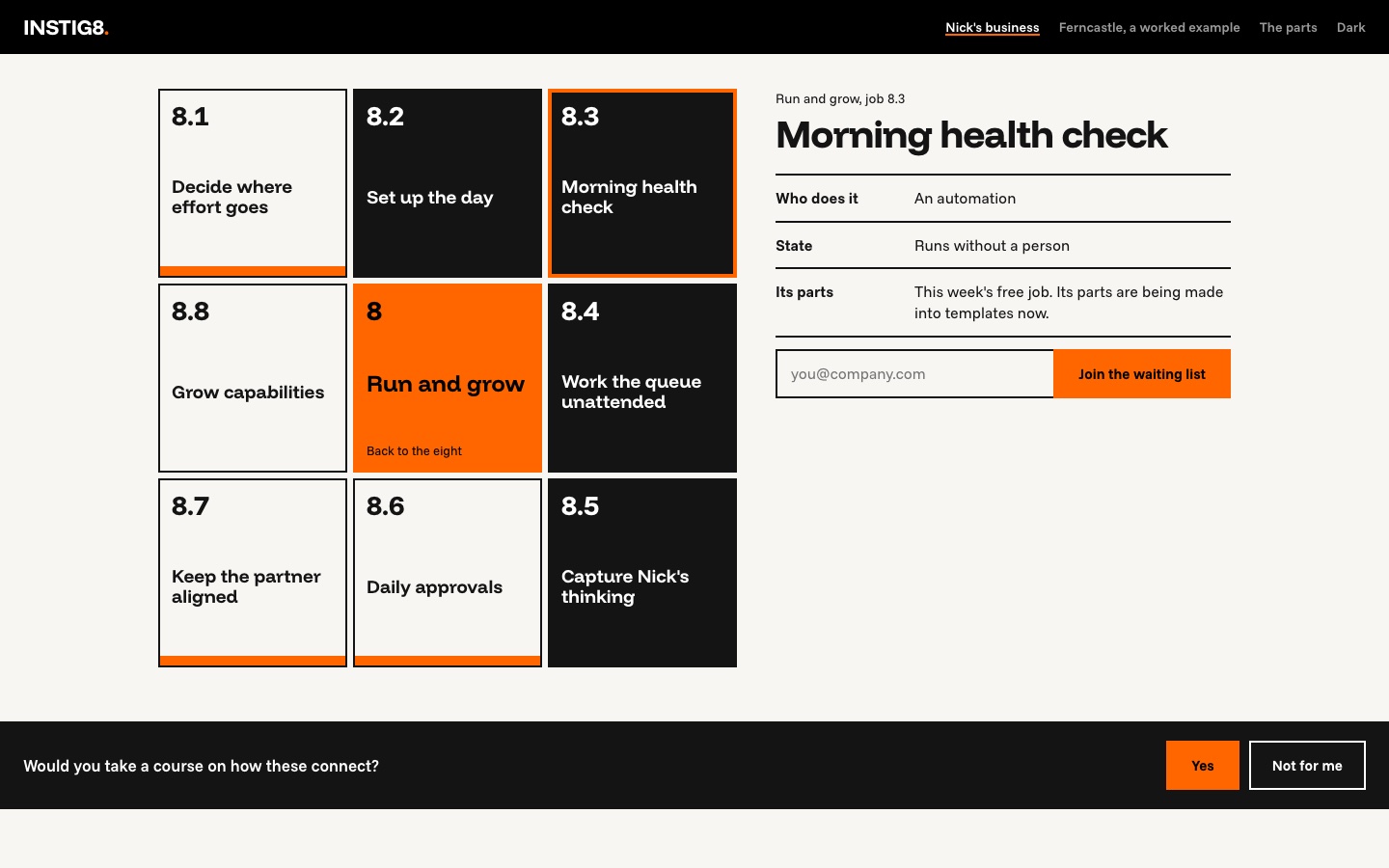
The site said eight jobs ran without a person. Of those eight, two had a verified run that week. A third job the site called unchecked turned out to be running, so three of the 48 ran on their own. Four jobs no longer existed at all. Their systems lived in my old operating folder: its background jobs were switched off on 27 September, and I archived the folder the next day. One of the four was the job on the first screen, "Check every morning that every system ran overnight."
6:01 p.m. "The fix doesn't matter right now"
The session drafted a fix and asked before changing the live site. I stopped it:
I see. The fix doesn't matter right now. What I think is more important is
the spirit of what you're doing, which I think is great. Tell me how you're
conducting this check and what the reason is. I want to develop a repo-wide
protocol or process that is consistent across all the workspaces, so the
workspaces match what you're updating on Instig8's site. [...]
A repo is a folder under git, so I was asking for one routine for every folder. The session's first framing was that each folder might own a slice of the 48 jobs. I didn't think that would work, because folders and jobs are organised differently: "They're two different models." One folder serves several jobs, and one job uses several folders.
What we landed on has three layers. The chart says what the business does, and names no tools. Each folder's automation list says how the work gets done. One line on each automation, "Serves: 2.1", says which job it serves; 2.1 is the first job under kind of work 2, Find. A job's label is then worked out, not typed: it runs without a person when the automations tagged to it ran. An automation with no tag is work the chart doesn't know about yet.
Then I pointed it at my practice folder. There, a loop already keeps the line, my written method, true. The loop is borrowed from a NASA method. It logs real events, such as a client's reply or an automation's run, and checks each against what the method said would happen. It changes the method only when the evidence repeats.
That is the same shape as the check. So the plan is one shared record of real events, the incident record, read twice. An incident here is any real event worth checking, not only a failure. A daily check reads it to update the chart's labels. A weekly review reads it to test the method.
The next day, 2:36 p.m. Twelve minutes of decisions
After an overnight gap, the decisions took from 2:36 to 2:48 p.m. First: "Yes, I think a shared incident record makes sense." Then "yes, a new folder of its own", then "call it the-chart". The session wrote the design into my practice folder and marked what I ruled and what it only proposed. Then it wrote the prompt above for the session that will build the folder. The-chart folder doesn't exist yet.
What went wrong
- The AI invented an answer before it found mine. Its first eight functions came from guessing. My file existed; it hadn't looked in the archive. Fixed in a minute once I pointed.
- The site went live with a claim that wasn't true. For about a day, the first screen showed a job that had stopped running. I chose to design the process first. On 3 October, before this post went up, I applied the check: ten labels changed, the four retired jobs came off the grid, and the first screen now shows a job with a verified run, filing my incoming email into the inbox I plan my day from.
- Shipping broke things. Deploying took three tries: a doubled path, then a broken upload. The working command is now written down. And two pages from the old site now return "not found".
- The AI's own counts were wrong, twice. It told me eleven labels had gone stale; its own table listed ten. It told me 13 of Ferncastle's jobs ran without a person; the file has 12. The fact check I ran for this post caught both, and the files are corrected.
- It skipped some of my plan. My prompt set five topics to ask me about, one at a time. After "just build the site", it answered the rest itself. That was faster, and it wasn't what the plan said.
The numbers
| First prompt to the site live | 63 minutes (4:06:47 to 5:10:22 p.m.) |
| "The design is right" to live | 10 minutes |
| Questions the session put to me before any design work, counting follow-ups | 8 |
| Mockups | 3 |
| Files changed in the rebuild | 40 (24 deleted, 9 added, 7 changed) |
| Automated checks on the site | 0 before, 54 after |
| Deploys to the live site (rebuild, Ferncastle, headline) | 3 that worked, plus 2 failed tries before the first |
| Jobs the site said run without a person | 8 |
| Of those, with a verified run in the last 7 days | 2 |
| Jobs with a verified run in the last 7 days, of all 48 | 3 |
| Jobs that no longer existed | 4 |
| Phrases a fresh reader couldn't follow | 25, then 6 after a rewrite |
| My own time | not tracked |
Steal this
1. The thinking prompt. Paste it before any design work.
This is a thinking session before it is a build. Work through with me what
[THE PAGE] is. Put to me, one at a time with your recommendation drawn from
my own files: [QUESTION 1]; [QUESTION 2]; [QUESTION 3]. Write the result as
one plain page in [FOLDER] before any design. Design only after I say the page
is right, and build only after I say the design is right.
2. The cold reader. Give a fresh AI only your page.
Read [FILE] and nothing else. You have never seen this before and know
nothing about who wrote it. You are the reader it is for: [WHO]. Go paragraph
by paragraph. For each, say in one line what you think it is asking you to do
or understand. Write STALL where you cannot, or where a word is used as if you
should already know what it means here. A confident wrong reading is a STALL
too, so say what you assumed. End with a numbered list of every STALL.
3. The check. Read only, with states defined before it starts. The states are the labels; "hand" means a person does the job, and "seat" means a person keeps it on purpose.
You are checking, READ-ONLY, whether these recurring jobs are actually
running today. Never write, edit, run, trigger, activate or deactivate
anything. Only read and list.

States: run = a successful run in the last [7] days; on = switched on, no
recent run; off = built, switched off; hand = done by hand; not built; seat =
kept with a person on purpose; gone = the system was retired and nothing
replaced it.

Jobs: [LIST WITH THE STATE YOU CURRENTLY CLAIM FOR EACH]

Return one row per job: the claimed state, the state today, the evidence
(file and line, or workflow name and last run), and your confidence. Then
list what is running that matches no job. Write UNKNOWN rather than guess.
4. The tag. One line under each automation in your automation list:
Serves: [JOB NUMBER] ([JOB NAME]) or Serves: none yet
What this means if you run a business
Every business already has two maps. One says what the business does: the org chart, the process map, the dashboard. The other is what actually runs: the tools, the automations, the people who quietly do the work by hand. Nobody keeps them in step, so the first map drifts. Mine drifted ten labels in a month, and I built both.
Here is the decision for this week. Pick one claim you make in public, say on your website or in a sales deck. Ask who checked it against what is running, and when. If the answer is "nobody, since we wrote it", you are missing a habit, and no AI tool supplies it. The habit is one line linking each system to the job it serves, and one short review a week of the places where the two maps disagree.
Credits and further reading
- Interpretable Context Methodology, Jake Van Clief and David McDermott: the folder method underneath all of this.
- Nielsen Norman Group, "Progressive Disclosure" (2006): show the few most important things first.
- Edward Segel and Jeffrey Heer, "Narrative Visualization: Telling Stories with Data" (Stanford, 2010): a short guided path first, then free exploration.
- Ben Shneiderman (1996): "Overview first, zoom and filter, then details-on-demand."
Where this goes next
The next session builds ~/work/the-chart, the folder that will hold the chart and the record of events. Then every folder adds one line per automation. Then the website reads its labels from the chart instead of from a file I typed, so the next check is a routine, not a surprise.